Logo Guide for Custom Gym Uniforms: File Formats, Colours and Print Positions

By David Allen, Personal Trainer Clothing
UK specialists in custom printed gym uniforms since 2013.
Last updated: 19 October 2026

Quick Answers

  • Best logo file: vector artwork (AI, EPS, SVG or vector PDF). It stays sharp at any size.
  • If you don’t have a vector file: a high-resolution PNG, ideally with a transparent background, at a minimum of 200 DPI at print size. A JPG is also possible, but supply the largest, clearest original you have.
  • Files to avoid: Please avoid screenshots, logos saved from social media, and Word or PowerPoint files.
  • Colours: use a light logo on dark garments and a dark logo on light garments, so it contrasts clearly.
  • Print positions include: chest, upper back and sleeve. Available positions and print areas vary by garment.
  • Staff names and job titles: you can add names, job titles or both.
  • Artwork check: every order is manually reviewed before production. We’ll contact you if anything needs your input.

This guide will help fitness businesses prepare their logo, choose suitable print colours and positions, and add staff names or job titles to create professional custom printed uniforms.

What logo file format is best for custom printed uniforms?

A vector logo file, such as AI, EPS, SVG or vector PDF, gives the sharpest results, with a high-resolution PNG a good alternative.

File type What to supply
Vector
Recommended
AI, EPS, SVG or vector PDF. Stays sharp when enlarged.
PNG High resolution, ideally with a transparent background. Minimum 200 DPI at print size.
JPG Largest, clearest original available. Simple backgrounds can usually be removed.
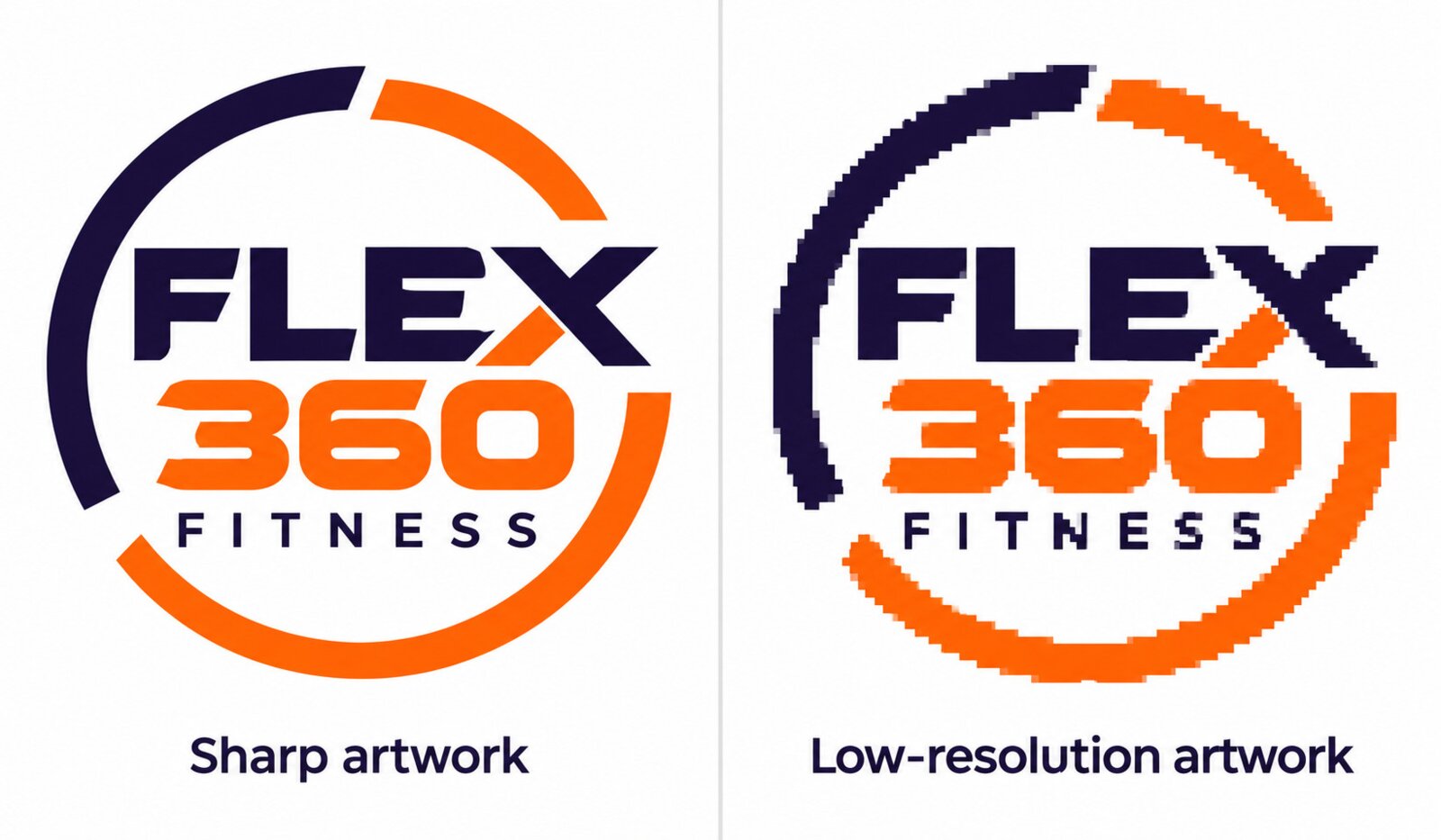
Sharp logo artwork compared with a pixelated, low-resolution version of the same design

What resolution does my logo need?

For PNG and JPG logos, aim for at least 200 pixels per inch (PPI, often referred to as DPI) at the size you want the logo printed. Lower-resolution artwork may still be suitable, depending on the design and printing method. Vector artwork can be enlarged without losing sharpness.

Send the original, highest-quality file where possible. Increasing the resolution setting alone will not restore detail to a small or blurry image.

Thin lines, very small text and fine details such as gradients and soft shadows may not reproduce clearly at smaller print sizes. Before you order, check how your logo looks at the size you want it printed, either by printing it on paper at actual size or by using the Online Designer preview.

Logo files to avoid

Please avoid sending screenshots, logos saved from social media or a website, and logos placed inside Word or PowerPoint documents. These are usually compressed or low resolution, so they rarely print sharply, even when they look fine on screen. If you don’t have your original logo file, ask whoever designed your logo or built your website to send it.

Tip: Send us your best logo file

Not sure your logo is suitable? Send us the best version you have. We’ll review it and contact you if any changes need your input.

Ready to upload your logo?

BROWSE PRODUCTS →
START DESIGNING →

How are logos applied to your uniforms?

We apply logos using digital heat transfer press printing, which are well suited to polyester and performance garments. We don’t offer embroidery.

Why do we use printing for performance garments?

Lightweight, stretchy performance fabrics can be less suited to embroidery. Dense stitching can pull or pucker the fabric, add weight and restrict stretch around the logo. The backing used to support embroidery may also feel uncomfortable against the skin during exercise.
How do I choose logo colours that stand out?

Choose logo colours that contrast clearly with your garment so your design is easy to recognise.

Light logo on dark fabric

White or light-coloured logos stand out clearly on navy, black and other dark garments.

Dark logo on light fabric

Navy, black or other dark-coloured logos work well on white and lighter-coloured garments.

Mid-tone garments

Garments in mid-tone colours, such as grey or red, can be harder to match with a logo, because neither a light nor a dark logo always stands out clearly. Check the contrast in the Online Designer preview before making a decision.

Tip: Check full-colour logos against the fabric

If your logo uses several colours, check that every part of the design remains visible against your chosen garment colour.

Where can I print my logo on gym uniforms?

Common logo positions include the chest, upper back and sleeve, with available options depending on your chosen garment.

Chest

Left chest is the traditional position for a small logo, creating a smart, professional appearance.

Upper Back

Useful for a larger logo or job title, helping members and clients identify staff from behind.

Sleeve

An option for a secondary logo or small additional design.

Available positions and print areas vary by garment. Preview the options for your chosen product in our Online Designer.

Typical print Sizes

Position Best for Maximum print size
Chest A small logo, for a smart, professional look 10 × 10 cm
Upper back A larger logo or job title 26 × 12 cm
Sleeve A secondary logo or small additional design 10 × 10 cm

Can I add staff names and job titles?

You can add staff names, job titles or both to help members and clients identify the right person. They also make introductions easier and create a more personal, approachable experience.

  • Choose names, job titles or both.
  • Keep lettering clear and easy to read.
  • Use consistent positioning across garments where practical.
  • Select the details that are useful for each role.

What should I check before ordering?

Before ordering, check your logo quality, colour contrast, print positions, spelling, garment sizes and quantities. For help choosing garments and quantities, see our Fitness Uniform Buying Guide.

Check your artwork Check your order
  • You have uploaded the highest quality logo available.
  • Your logo contrasts clearly with the garment colour.
  • You have selected the correct print positions.
  • Staff names and job titles are spelt correctly.
  • Garment colours, sizes and quantities are correct.
  • You have reviewed each different design in your basket.

For help uploading and positioning your artwork, follow our Online Designer Guide.

Will you check my artwork before printing?

Every order is manually reviewed before production to check logo quality, print size and colour contrast. We’ll contact you if we identify an issue that needs your input.

1. Review Your Artwork

We check your logo and design for suitability, including the quality of the file and the proposed print size.

2. Contact You if Needed

We’ll contact you before production if an issue or significant design change needs your approval

3. Prepare for Production

Once any necessary changes and approvals are complete, we prepare your uniforms for printing.

Artwork proofs are provided where additional approval is required. A separate proof is not automatically supplied with every order.

Helpful Resources

Explore our other resources for practical advice, answers to common questions and real examples of how businesses have created professionally customised uniforms with Personal Trainer Clothing.

Thank you for reading our Logo Guide. We hope it has provided useful advice on preparing your logo to achieve the best possible print quality.

BRING YOUR LOGO TO LIFE

Create a professional look with custom printed fitness uniforms. Browse our range to find the right garments for your business, or request a quote for help with your requirements.

BROWSE PRODUCTS →
REQUEST A QUOTE →
Search
Search